Make image backgrounds transparent on your Mac, a whole folder at a time
To make a background transparent, remove it and save the image in a format that keeps transparency: PNG, HEIC, AVIF or TIFF. JPEG can't. Sweepcut does it for a whole folder at once on your Mac: drop the folder in, choose a transparent background and a format, and export. Your filenames are kept and your originals are never overwritten.
A photo, made transparent
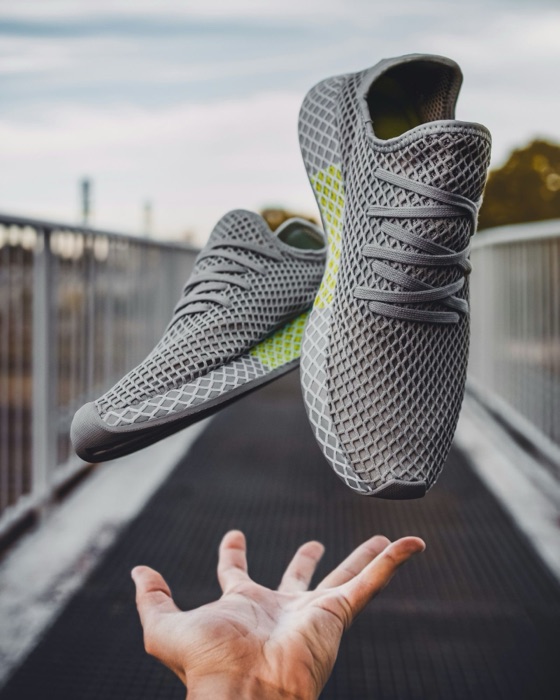
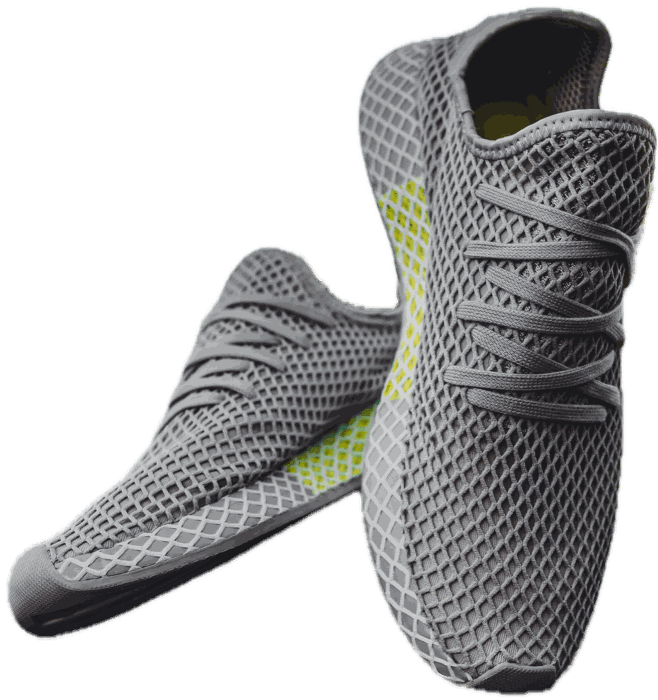
Real Sweepcut output of a full-resolution photo (3505 × 4381), resized for this page.
Make a folder of images transparent in Sweepcut
- 1
Drop in the folder
Every image inside is found, subfolders included, and each background is removed on your Mac.
- 2
Choose Transparent
Pick the transparent background, then PNG, HEIC, AVIF or TIFF as the format.
- 3
Export
Every image is saved to a Cutouts folder with its original name, so nothing is overwritten.
Which formats keep transparency
| Format | Transparent? | Our test export | Good for |
|---|---|---|---|
| PNG | Yes, lossless | 7.09 MB | Almost everything: websites, slides, Canva, documents |
| HEIC | Yes | 2.14 MB | Smaller files for Apple devices and apps |
| AVIF | Yes | 1.73 MB | The smallest files, where the app or site accepts AVIF |
| TIFF | Yes, lossless | 7.75 MB | Print and further editing |
| JPEG | No | Not applicable | A cut-out on white or a colour, such as listing photos |
One Sweepcut cut-out (2673 × 2843) exported in each format on 22 October 2026. All four transparent files have exactly the same see-through area. HEIC and AVIF were saved at Sweepcut's default 92% quality; PNG and TIFF are lossless. AVIF appears only on Macs whose macOS can write it.
Removing a white background, including from logos
For photos, Sweepcut uses Apple's subject detection, which removes white, grey or busy backgrounds alike.
For flat graphics on white, such as logos and icons, choose Colour key instead. It removes the white wherever it touches the edge of the image, clears the holes inside letters, and keeps parts that Apple's model can miss, like separate letters and small shapes. See removing the background from a logo for the details.


Where transparency doesn't survive
JPEG files. JPEG can't store transparency, so any transparent area is filled with a colour. Sweepcut always gives a JPEG a solid background, white unless you choose another.
Some marketplaces. Etsy shows transparent areas of a PNG as black, and Amazon's main image must be on pure white. For those, export on white instead. See the Etsy and Amazon guides.
Checking it worked. Some apps show transparent areas as white, so a cut-out can look unchanged. Place it on a coloured background, such as a slide, to check.
The built-in way, one image at a time
For a single image, Preview can remove the background too: open the image, click the Remove Background button, and convert it to PNG when asked (or choose File > Duplicate first to keep the original). It uses the same Apple model as Sweepcut's Subject method.
Steps from Apple Support, Remove a background or extract an image in Preview on Mac, checked on 22 October 2026. For what Sweepcut adds on top, see Sweepcut vs Preview.
Nothing leaves your Mac
Sweepcut processes every photo 100% on your Mac, inside the macOS sandbox. Your photos are never uploaded, camera data and GPS location are removed from every export, and there's no account to create. Once activated, it works with Wi-Fi turned off.
Transparent backgrounds on a Mac
How do I make the background of an image transparent on a Mac?
Remove the background, then save as PNG, HEIC, AVIF or TIFF. In Sweepcut, drop in the image or a whole folder, choose the transparent background and a format, and export.
Which image formats keep a transparent background?
PNG, HEIC, AVIF and TIFF can all keep transparency. JPEG can't, so a JPEG always has a solid background.
Why does my transparent PNG show a black background?
The app or site you uploaded it to doesn't support transparency and filled it with black. Etsy does this, for example. Export the image on white or another solid colour instead.
Can I remove a white background from a logo?
Yes. In Sweepcut, choose Colour key for the logo. It removes the white around it, clears the holes inside letters, and keeps soft highlights.
Will Sweepcut overwrite my original images?
No. Exports go to a Cutouts folder with the same filenames, and the originals are never changed.
Which Macs does Sweepcut run on?
Sweepcut needs macOS 14 Sonoma or later. It's built for Apple Silicon and runs more slowly on Intel Macs.
Your whole folder, transparent in one go.
Secure payment by Gumroad · macOS 14 Sonoma or later · Apple Silicon recommended · Back to Sweepcut